How Much Does It Cost to Install Digital Menu Boards in a Restaurant?
A digital menu board can cost anywhere from a small monthly software subscription, when you already own a compatible TV, to several thousand dollars for a professionally installed, multi-screen restaurant setup. The total depends on the television, mounting equipment, media player, installation, menu design and software you choose. With Billiie, your first screen is free, forever, and you can then run 10 screens for just $10 a month with digital signage for restaurants.
The good news? You don't necessarily need commercial-grade equipment, expensive hardware or a professional installation company to turn a television into a digital menu board.
Whether you own a deli, pizza shop, café, food truck, bakery or fast-food restaurant, this guide explains what digital menu boards cost, how they compare with traditional printed menus, and how to set up your own system without overspending. We'll cover the equipment you actually need, optional expenses, ongoing subscription fees, and the easiest ways to manage your restaurant menus remotely.
Digital menu board cost at a glance
Before purchasing anything, it's important to understand that digital menu boards involve two different types of expenses:
One-time costs: TVs, wall mounts, streaming devices, installation and menu design.
Recurring costs: Digital signage software, optional content management, and any additional connectivity or maintenance expenses.
Here is an example planning budget for a small restaurant:
| Expense | Illustrative cost |
|---|---|
| 43-inch consumer TV | $150–$300 |
| TV wall mount | $20–$60 |
| Compatible streaming device | $25–$60 |
| DIY installation labor | $0 if self-installed |
| Professional installation | $100–$250+ |
| Menu design | $0 if DIY; varies if outsourced |
| Billiie software, first screen | Free, forever |
| Billiie software, 10 screens | $10/month |
These are illustrative budgeting ranges, not verified market averages or vendor quotes. Actual equipment and labor prices vary by location, model, installation conditions and provider.
For restaurants that already own suitable TVs, the startup cost can be significantly lower. A restaurant with five compatible televisions, for example, may only need supported streaming devices and digital signage software to begin displaying menus. That's why it's worth checking your existing equipment before buying anything new. (For a wider look beyond menus, see our guide to how much digital signage costs.)
What is a digital menu board?
A digital menu board is a television or electronic display used to show restaurant menu items, prices, food images, specials and other information. Unlike traditional printed menus, digital menu boards can be updated electronically. A restaurant owner can change the price of a sandwich, introduce a new lunch special or replace an entire breakfast menu without ordering another printed sign.
Digital menu boards are commonly installed above restaurant counters, near ordering stations, inside drive-thru areas and in customer waiting spaces. They can display:
Restaurant menus and prices
Breakfast, lunch and dinner selections
Food photography
Daily specials and meal combinations
Promotional advertisements and seasonal offerings
QR codes and announcements
A single screen can display one menu, while larger restaurants can use multiple screens to organize different categories. A deli, for example, might use separate televisions for breakfast, sandwiches, hot food, salads and drinks. The screens are controlled with digital signage software, so the owner can manage content from a phone or computer.
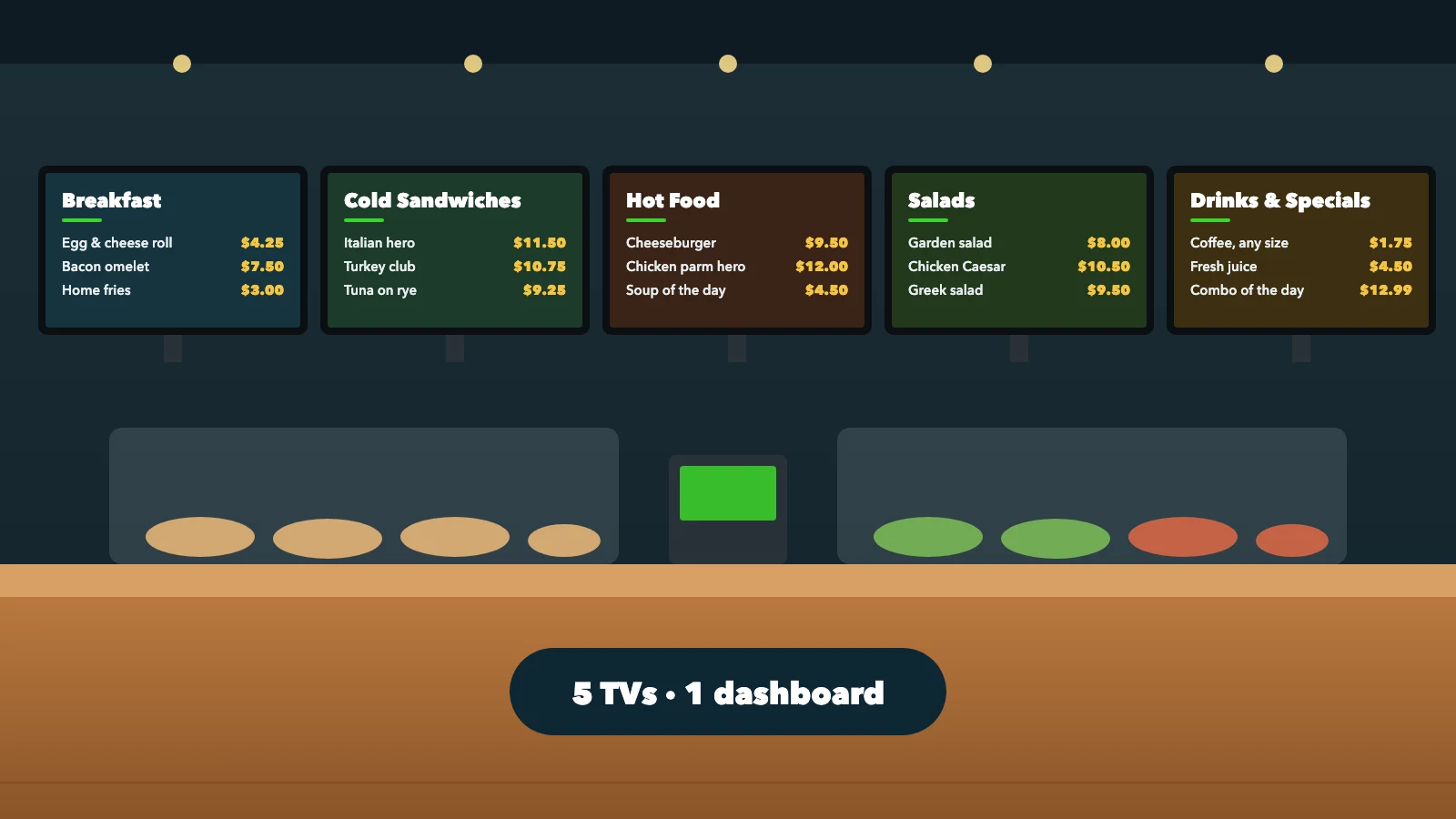
Illustrative five-screen deli menu wall
Why digital menu boards are becoming more popular
Keeping expenses in check and running day-to-day operations efficiently are core parts of managing a small business. For restaurant owners, digital menu boards offer a practical way to modernize both. Instead of reprinting menus whenever prices or promotions change, restaurants can update their displays electronically, reduce manual work and keep information consistent across multiple screens.
What determines the cost of a digital menu board?
1. Television size and type
The television is usually one of the largest upfront expenses. A small café may only need one 32-inch or 43-inch screen, while a large restaurant might prefer several 50-inch or 55-inch displays. Larger screens generally cost more, although prices also depend on brand, display technology, brightness and specifications.
Before choosing a television, consider how far customers will stand from the menu. A screen that looks large in your living room may appear small when mounted high above a restaurant counter. Readable text is more important than buying the largest television available. Our guide to choosing the right monitor can help.
2. Consumer TV vs. commercial display
You have two main hardware options:
Consumer televisions are standard TVs sold for homes and general entertainment. They are often an affordable option for restaurants operating during normal business hours.
Commercial digital signage displays are designed for business environments and may offer extended operating-hour ratings, commercial warranties, improved brightness and additional management capabilities. They can be more expensive.
Not every restaurant needs a commercial display. For many independent restaurants, a compatible consumer television is a reasonable starting point. We compare both in detail in consumer TV vs. commercial display for digital signage.
3. Media player requirements
Some televisions can run digital signage applications directly. Others require an external streaming device or dedicated media player. Billiie runs on supported Amazon Fire TV and Android TV devices, so compatible TVs can display menus without a proprietary signage player. Before buying a device, verify app compatibility, operating-system support and the requirements of your chosen software.
4. Installation and mounting
Installation costs depend on the number of screens, wall material, mounting height, electrical access and cable routing. A straightforward installation on a suitable wall may be relatively inexpensive. More complicated installations, such as mounting several televisions above a counter, may involve additional labor, cable management and electrical planning. For placement ideas, see the best places to put TV screens in a restaurant.
5. Digital signage software
Software is what turns a screen into a remotely managed digital menu board. It lets restaurant owners upload menus, schedule promotions, assign content to screens and make updates without manually replacing files on every television. Some providers charge separately for each screen, while others offer bundled plans.
Billiie gives you the first screen free, forever, then 10 screens for $10 a month. That makes software costs predictable for restaurants running several menu boards.
Traditional printed menu boards vs. digital menu boards
One of the most common questions restaurant owners ask is whether switching from printed menus to digital screens is worth the investment. The answer depends on how often your menu changes and how you want to communicate with customers.
Traditional printed menu boards are familiar, straightforward, and don't require electricity or software. However, they become inconvenient when prices, products and promotions change frequently. Digital menu boards require equipment and setup but offer greater flexibility.
Cost and feature comparison
| Feature | Traditional printed menu | Digital menu board |
|---|---|---|
| Initial equipment | Printed sign or board | TV and optional player |
| Price changes | May require reprinting | Update digital menu content |
| Daily specials | Replace or add printed material | Schedule new content |
| Video support | No | Yes |
| Remote updates | No | Yes, with supported software |
| Electricity | Not required | Required |
| Monthly software | None | Depends on provider |
| Multiple locations | Manual coordination | Centralized management possible |
| Maintenance | Cleaning and replacement | Equipment and software upkeep |
Example: a restaurant that changes its menu frequently
Imagine a deli that updates its menu every month. It might change sandwich prices, add seasonal items, introduce new drinks or promote weekly specials. With printed menus, every substantial change could require new printed materials or manual corrections. With digital menu boards, the owner updates the original menu design and uploads the new version, and the television shows it without a replacement physical sign.
The financial benefit depends on how much the restaurant currently spends on printing, design and staff time. For restaurants with frequent changes, digital menus may reduce recurring printing work. For restaurants with menus that rarely change, traditional boards may remain economical.
How much do printed menu boards cost over time?
The cost of printed menu boards depends on the material, dimensions, quantity, design and replacement frequency. A simple laminated menu may be inexpensive; large illuminated menu panels, professionally printed graphics or custom signage can cost considerably more. Rather than assuming one average price, calculate your own restaurant's expenses.
For example, suppose a restaurant spends $75 each time it replaces printed menu materials, replaces them four times a year, and spends another $100 a year on temporary promotional signs:
$75 × 4 = $300$300 + $100 = $400 per year
Over three years, the restaurant would spend $1,200 if those costs stayed the same. This is an illustrative example, not an industry average.
Now compare that with digital signage. A restaurant using an existing compatible television and Billiie's $10 monthly plan would spend $120 a year on software, or nothing at all on a single free screen. The difference is $280 a year in this example, before accounting for electricity, equipment, design work and maintenance.
This doesn't mean digital signage is always cheaper. It means the comparison should include long-term operating costs rather than just the initial purchase price.
How much does digital menu board software cost?
Digital menu board software is generally sold as a recurring subscription. Some providers charge per screen, while others offer bundles, account-based subscriptions or enterprise agreements. Features differ too: a basic system may only display uploaded images, while more advanced systems support scheduling, playlists, remote management, multiple users and equipment monitoring.
Example monthly software costs
The table below compares hypothetical per-screen subscription rates with Billiie's published plan.
| Number of screens | $5/screen plan | $10/screen plan | Billiie |
|---|---|---|---|
| 1 | $5 | $10 | Free |
| 5 | $25 | $50 | $10 |
| 10 | $50 | $100 | $10 |
The $5 and $10 columns are hypothetical comparison rates, not quotes from competing companies. Billiie: first screen free, forever; then 10 screens for $10/month.
For a restaurant running ten screens, the difference between a hypothetical $10-per-screen subscription and Billiie's $10 plan would be $90 a month, or $1,080 a year in software savings under those assumptions.
However, price should not be the only factor. Compare device compatibility, reliability, support, scheduling and the features your restaurant actually needs.
Can you use a regular TV as a digital menu board?
Yes. Many regular televisions can be used as digital menu boards when connected to compatible digital signage software or a supported media player. This is one of the easiest ways for a small restaurant to reduce startup costs. If your restaurant already has a suitable television, you may be able to repurpose it: a 43-inch TV previously used for entertainment could become a menu board showing sandwiches, drinks or breakfast specials.
What should you check before using an existing TV?
Screen condition: Make sure the display is working properly.
Resolution: Full HD or 4K provides sharp menu graphics.
Brightness: Customers should be able to read the screen under restaurant lighting.
Viewing distance: Menu prices and descriptions should be legible from the ordering area.
Operating hours: Confirm the television is suitable for your intended daily use.
Connectivity: Check whether the TV supports the app or needs a streaming device.
Power settings: Review sleep timers, screensavers and automatic shutdown settings.
A regular television may be perfectly adequate for a small restaurant operating several hours a day. A restaurant requiring continuous operation, or displaying content in unusually bright conditions, may benefit from commercial-grade equipment.
How to turn a regular TV into a digital menu board in 5 steps
You don't need advanced technical knowledge to set up a basic restaurant digital menu board. With compatible hardware and Billiie, it takes a few straightforward steps. (For the design side, see our full guide on how to create a digital menu board.)
Step 1: Choose your television
Start with a TV you already own or buy one that fits your restaurant. Consider where customers will stand, how much menu information you need to show, and whether the screen will be mounted horizontally or vertically. For a large menu, multiple screens may be easier to read than one crowded display.
Step 2: Install the Billiie app
Billiie supports compatible Amazon Fire TV and Fire TV Stick devices, plus Android TV devices (including Google TV models). If your television doesn't run the app directly, connect a compatible streaming device through HDMI. Install Billiie, open it on the screen, and make sure the device has a reliable internet connection.
Step 3: Create your free Billiie account
Visit Billiie.co from your phone or computer, create your account and open the screen-management dashboard. Your first screen is free, forever, so you can test digital signage before committing to a multi-screen plan. Begin with one television and expand when needed.
Step 4: Pair your television
Follow the pairing instructions shown by Billiie and enter the pairing code to connect your screen to your account. Once paired, give the screen a recognizable name, such as:
Front Counter Menu
Breakfast Screen
Sandwich Menu
Drinks and Specials
Pickup Area Display
Clear screen names become especially helpful when you manage multiple televisions.
Step 5: Upload your menu and start displaying it
Create your menu with your preferred design software or a suitable finished template, then export it as an image or supported video file. Upload it to Billiie, assign it to your screen and configure the display.
That's it. Your television is now a digital menu board, and you can update it remotely instead of replacing printed signs every time a price changes.
How to create a digital menu board without hiring a designer
Professional menu design can be valuable, but it isn't always necessary. Restaurants can create their own menu graphics with design applications, templates or other graphic-design tools. The important thing is to make the menu readable and visually organized. Our menu board design tips go deeper.
Start with the correct screen size
For a standard horizontal Full HD television, a 1920 × 1080-pixel design is a common starting point. A vertical screen needs a portrait layout. Match the design's aspect ratio to the display so the content doesn't appear stretched or cropped.
Organize menu categories
Avoid placing every item on one screen. Divide your menu into logical sections instead:
Screen 1: Breakfast sandwiches and omelets
Screen 2: Cold sandwiches and heroes
Screen 3: Hot food and burgers
Screen 4: Salads and healthy options
Screen 5: Beverages and specials
This makes menus easier to read while giving the restaurant more flexibility.
Use large, readable text
Customers should be able to identify menu items and prices quickly. Use clear typography, strong contrast and enough spacing between items, and avoid squeezing long descriptions into small areas. The right font size depends on screen size, viewing distance and resolution, so test the design from the actual ordering position.
Use real food photography
Good food photography makes a digital menu more appealing. Whenever possible, use photographs of the actual products you sell. This helps customers understand what they're ordering and avoids presenting unrealistic images.
Keep your menu board designs consistent
When using multiple TVs as digital menu boards, keep your restaurant's colors, fonts and overall layout consistent. This looks professional and makes menus easier to read across screens.
With Billiie, you upload your finished menu images or videos and assign different content to each television: breakfast on one screen, sandwiches on another, drinks on a third. You can also set start and end dates for seasonal menus and promotions, manage screens remotely, and replace outdated designs without USB drives or reprinting.
DIY digital menu boards vs. professional installation
Both options can work. The right choice depends on your equipment, technical comfort, available time and installation requirements.
Option 1: Do-it-yourself installation
DIY installation is often practical for restaurants with existing mounted televisions or straightforward display requirements. You may only need to connect a compatible streaming device, install the software, pair the screen and upload your menu.
Advantages: Lower labor costs, more control over the setup, the ability to start with existing equipment, and easier experimentation with layouts.
Disadvantages: You handle troubleshooting, mounting may require specialized tools, cable management can be challenging, and electrical work may require a licensed professional.
If your television is already safely mounted and has power, setting up the software is usually straightforward.
Option 2: Professional installation
Professional installation may suit restaurants mounting several large TVs above counters. An installer can help with wall mounting, screen positioning, cable management and equipment placement.
Advantages: Professional mounting, help positioning equipment, potentially cleaner cable management, and less installation work for staff.
Disadvantages: Additional upfront expense, scheduling appointments, and potential charges for complex mounting or electrical work.
Always use appropriate mounting hardware and qualified professionals where needed.
Example: setting up five digital menu boards in a deli
Let's build an illustrative budget for a neighborhood deli that wants five menu screens for breakfast, sandwiches, hot food, salads and drinks. Instead of expensive commercial displays, the owner chooses consumer TVs and compatible streaming devices.
| Item | Quantity | Example total |
|---|---|---|
| 43-inch TVs at $200 | 5 | $1,000 |
| Wall mounts at $30 | 5 | $150 |
| Streaming devices at $40 | 5 | $200 |
| Installation allowance | — | $500 |
| Billiie software | — | $10/month |
Illustrative upfront total: $1,850
Annual Billiie software cost: $120
Illustrative first-year total: $1,970
This estimate excludes taxes, menu design, electrical work, connectivity and maintenance. The actual cost could be lower if the deli already owns TVs or handles installation itself, or higher if it needs professional equipment or a more complicated installation. The key point: the software subscription doesn't need to become a major expense.
Example: ten digital menu boards across multiple locations
Digital signage becomes particularly useful when a business operates more than one location. Imagine a restaurant company with three locations and ten screens in total:
| Location | Screens |
|---|---|
| Restaurant A | 4 |
| Restaurant B | 3 |
| Restaurant C | 3 |
| Total | 10 |
With Billiie's 10-screen plan, the software subscription would be $10 a month, or $120 a year. One dashboard organizes every display and assigns content to individual screens, so each restaurant can show its own specials while keeping a consistent visual identity. The company could promote the same seasonal item at all locations while keeping location-specific menu information separate.
How much electricity do digital menu boards use?
Electricity is another cost to consider. It depends on the television's actual power draw, brightness settings, operating hours and your local electricity rate. You can estimate it with a simple formula:
Power (kW) × operating hours × electricity rate = estimated electricity cost
For example, a television that draws 75 watts uses 0.075 kilowatts. Running 12 hours a day for 30 days:
0.075 × 12 × 30 = 27 kWhAt an illustrative $0.20 per kWh:
27 × $0.20 = $5.40 per month
For five televisions under the same assumptions, that's about $27 a month. These figures are examples, not predictions of your actual bill. Check the TV's power specifications and your utility rate for a more accurate number, and include any external media players.
Are there hidden costs with digital menu boards?
Digital menu boards can be affordable, but it's worth knowing every possible expense before you buy:
Menu design updates: If you hire a designer, future changes may involve design fees. Keep editable source files or manage designs yourself to reduce this.
Hardware replacement: Televisions and media players eventually fail or need replacing. Consider warranty coverage and the operating environment.
Internet connectivity: Cloud-based platforms generally need internet access for setup, synchronization and remote updates. Some systems cache content, but behavior during an outage depends on the software and device.
Professional content management: Some restaurants hire a service provider to handle promotions, menu changes and scheduling. This is optional and separate from the software subscription.
Installation changes: Moving televisions, changing wall mounts or adding electrical outlets can add costs.
How can restaurants save money on digital menu boards?
1. Reuse existing TVs
Before purchasing new displays, inspect the televisions you already own. If they're compatible and suit your operating environment, you may not need new hardware.
2. Avoid unnecessary commercial equipment
Commercial displays have real advantages, but not every restaurant needs them. Choose equipment based on operating hours, lighting, durability and warranty needs rather than assuming the most expensive screen is best.
3. Start with one screen
You don't have to replace every printed menu at once. Start with a single digital menu board and see how it performs. Billiie's free first screen lets you try it before expanding.
4. Create your own menu designs
Use a design tool and reusable templates to cut recurring design costs, and keep your files organized so updates are quick.
5. Compare software pricing carefully
A low hardware price can be offset by expensive monthly subscriptions. Calculate the total cost over one, three and five years before committing to a platform.
6. Use screens for multiple purposes
A digital menu board can show more than menu items. Use screen space for specials, catering offers, promotions and announcements to get more value from your displays. Here are some ideas to promote daily specials with digital screens.
Digital menu board cost over five years
When comparing systems, look beyond the first month's subscription. A small difference in monthly software pricing becomes significant over several years. Here are ten screens on two hypothetical subscription rates compared with Billiie's plan:
| Software pricing | Monthly | 1 year | 5 years |
|---|---|---|---|
| Hypothetical $5/screen | $50 | $600 | $3,000 |
| Hypothetical $10/screen | $100 | $1,200 | $6,000 |
| Billiie 10-screen plan | $10 | $120 | $600 |
Assumes unchanged subscription rates, ten active screens and continuous service. Hardware, electricity, design, maintenance and other expenses are excluded.
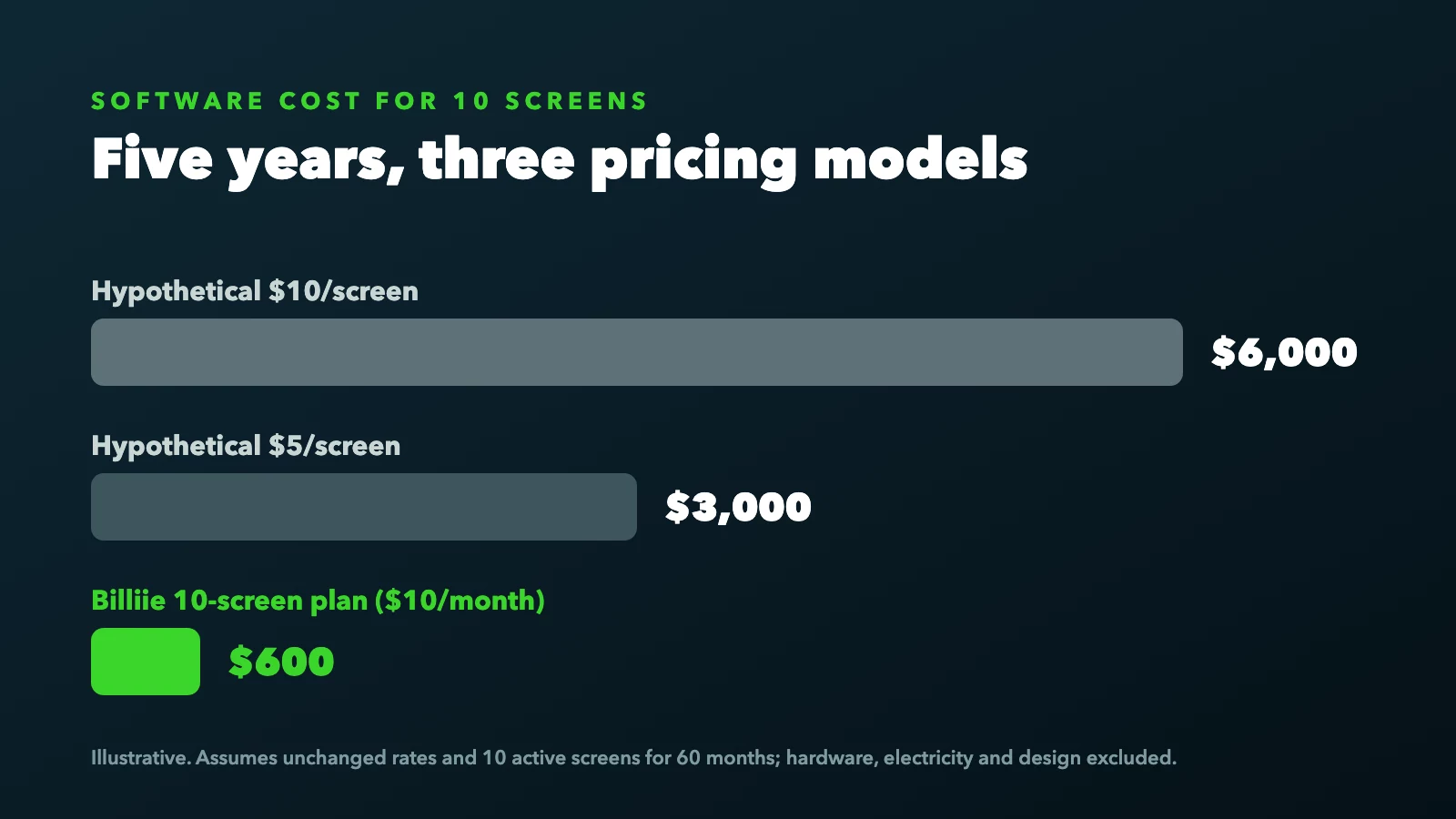
Five-year software cost for 10 screens (illustrative)
Under these assumptions, Billiie's subscription would cost $600 over five years, while a hypothetical $10-per-screen subscription would cost $6,000. That's a $5,400 difference in software costs alone. Competing products may offer different features, hardware support and service levels, so the right choice depends on your business requirements.
What features should restaurant digital menu board software include?
Before choosing software, identify the tasks your restaurant needs to perform. For most independent restaurants, simplicity and remote management matter most.
Remote content updates: Update menus without standing in front of the television, which is especially useful when prices change or new products arrive.
Scheduling: Show different content at different times, such as breakfast in the morning, lunch specials in the afternoon and dinner in the evening.
Multiple screen management: Organize content when each television displays a different category or promotion.
User access: Let managers or team members update specific screens.
Content flexibility: Support for images, videos and layouts that suit your displays.
Screen monitoring: See whether screens are connected or offline, which is particularly useful for multi-location operations.
Billiie provides remote content management, scheduling, playlists, screen assignments and screen-status monitoring, so restaurants can manage digital menus without complicated workflows.
How often should you update a digital menu board?
There is no universal rule. Some restaurants update their menus only when prices change; others update content daily. A coffee shop may rotate seasonal drinks, a deli may introduce weekly lunch specials, and a fast-food restaurant may show different meal options throughout the day.
Digital signage makes these changes easier because nothing is permanently printed. Still, avoid unnecessary changes that confuse customers. Menus should stay readable and consistent, and rotating content should stay on screen long enough for customers to read it.
Should restaurants use digital menu boards or QR code menus?
Digital menu boards and QR code menus serve different purposes. A digital menu board shows information on a television or monitor, so customers can read the menu without their phones. A QR code menu lets customers scan a code and open information on their own devices.
Digital menu boards are particularly useful for counter-service restaurants, delis and quick-service locations. QR menus can help with table service, extended product information or mobile ordering. Many restaurants use both: a café could show its main menu on televisions while offering a QR code for more details or ordering. Here's where to put QR code menus so customers actually scan them.
How many digital menu boards does a restaurant need?
The right number depends on menu size, customer viewing distance and available space. A small coffee shop may only need one or two screens, a deli with several food categories might benefit from four or five, and a large quick-service restaurant may use more. Before purchasing screens, ask:
How many menu categories do we have?
How much information needs to appear at once?
Where do customers stand while ordering?
Can customers comfortably read the menu?
Do we need separate promotional screens?
Avoid buying extra televisions simply because a software plan supports them. Start with the number your restaurant actually needs, and expand later.
Frequently asked questions about digital menu board costs
How much does a digital menu board cost?
The total cost depends on whether you already own a compatible TV, need new hardware or require professional installation. A new setup may involve a television, wall mount, optional media player, design work and software. Billiie's first screen is free, forever, and 10 screens cost $10 a month.
What is the cheapest way to create a digital menu board?
The cheapest practical approach is usually to reuse a suitable television, connect a compatible streaming device if needed, create your own menu graphics and use affordable digital signage software. Billiie lets you start with one screen for free.
Do digital menu boards require special TVs?
No. Many standard consumer televisions work as digital menu boards with compatible software or an external media player. Commercial displays may be preferable for longer operating hours, demanding environments or specific warranty requirements.
Can I use an Amazon Fire TV Stick for a digital menu board?
Yes. Compatible Amazon Fire TV Stick devices can run digital signage apps such as Billiie. Connect the device to your television, install the app, pair the screen and upload your menu content.
How much does digital menu board software cost per month?
Prices vary by provider, features and screen count. Some services charge per screen, while others offer bundled subscriptions. Billiie's first screen is free, and its 10-screen plan is $10 a month.
Can I update a digital menu board from my phone?
Yes. Cloud-based platforms such as Billiie let you manage screen content remotely from a browser. Update your menu design, upload the revised content and assign it to the right display.
Can I display different menus on different televisions?
Yes. With suitable digital signage software, each screen can show different content: breakfast on one television, sandwiches on another and drinks on a third.
Do digital menu boards need an internet connection?
Internet access is generally required for initial setup, pairing, synchronization and remote updates. Some software and devices keep playing cached content during short connectivity interruptions, but this varies by system.
Are digital menu boards better than printed menus?
Digital menu boards are often more flexible for restaurants that frequently change prices, products and promotions. Printed menus can remain a good choice for businesses with stable menus, limited budgets, or locations where electronic displays are impractical.
Can I set up a digital menu board myself?
Yes. If your television is already safely installed and supports a compatible device, software setup is straightforward. You may still need professional help for wall mounting, electrical work or complex installations.
How much does it cost to run ten digital menu boards?
The total includes equipment, electricity, design and software. Billiie's 10-screen software plan costs $10 a month, or $120 a year, excluding other expenses.
Can I use digital menu boards in multiple restaurant locations?
Yes. Cloud-based digital signage software lets you manage screens across multiple locations. Each restaurant can show its own menu or promotions while you manage the whole system remotely.
Is a digital menu board worth the investment?
Digital menu boards can be worthwhile for restaurants that want to update menus more efficiently, reduce repeated printing and display promotions on existing television screens. The financial value depends on the restaurant. A business that rarely changes its menu may not need a sophisticated digital system, but a deli with daily specials, a café with seasonal drinks, or a restaurant with multiple menu categories may benefit from remote updates and scheduling.
The biggest mistake is assuming digital menu boards must involve expensive commercial hardware and large recurring subscriptions. In many cases, a compatible television and affordable software are enough to get started.
Final thoughts: digital menu boards don't have to be expensive
The cost of digital menu boards depends on your equipment, installation requirements and software subscription. But getting started doesn't have to mean buying an entirely new commercial signage system. Many restaurants can reuse existing televisions, connect compatible streaming devices and manage menus through cloud-based software. The key is choosing a solution that fits your business rather than paying for unnecessary equipment or features.
Billiie makes digital menu boards accessible to small restaurants with a straightforward offer: your first screen is free, forever. Then get 10 screens for just $10 a month. Upload your finished menu designs, assign them to your TVs, schedule content and update your displays remotely. Whether you run a neighborhood deli, pizza shop, café, bakery or several restaurant locations, you can start with one screen and expand as needed.
Learn more about digital signage for restaurants and how Billiie helps restaurants display menus, specials and promotions.
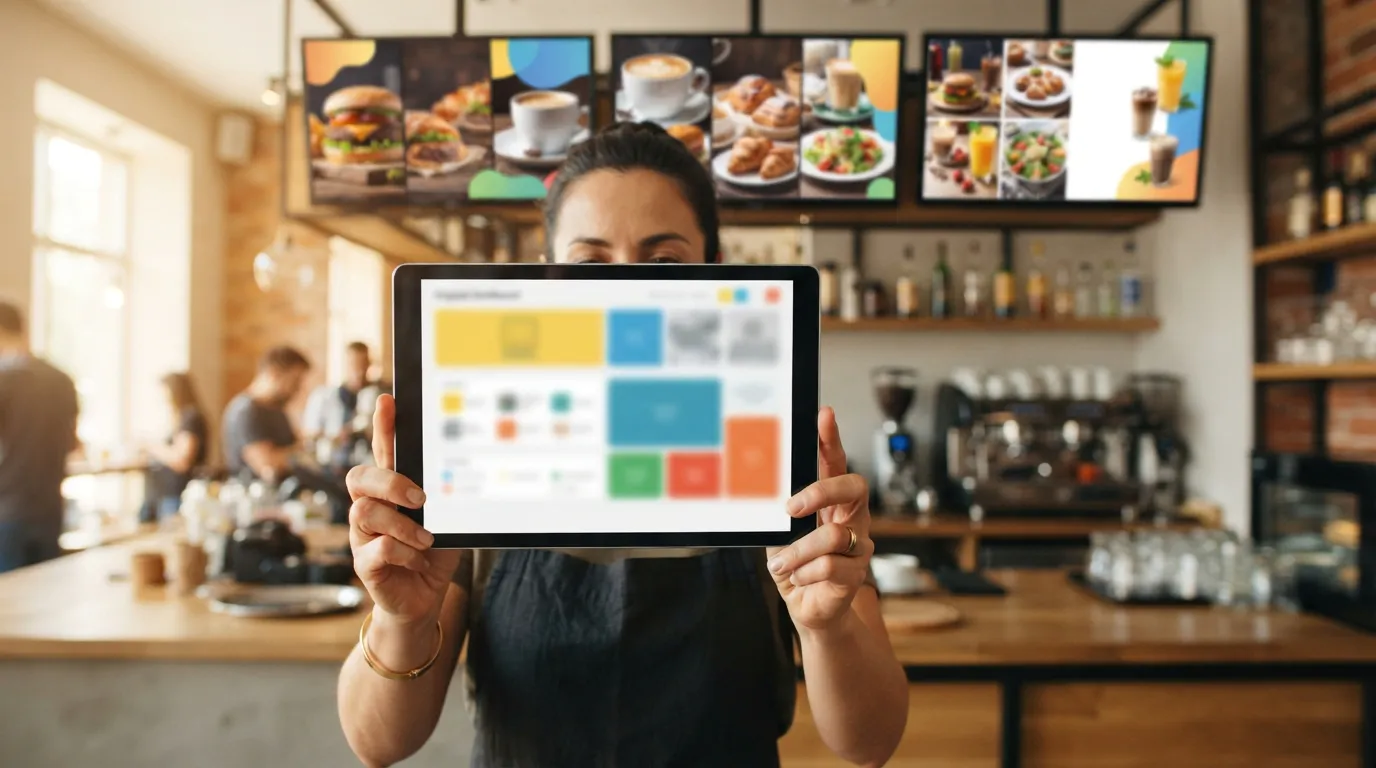
Ready to bring Billiie to your business?
Manage your screens, content, and locations from one simple dashboard.
No commercial signage hardware neededPowered by Billiie