Digital Signage for Waiting Rooms & Medical Offices
Show patient education, office information, QR codes, and quizzes on your waiting-room TVs — and manage every screen from one account for $1/month per screen.
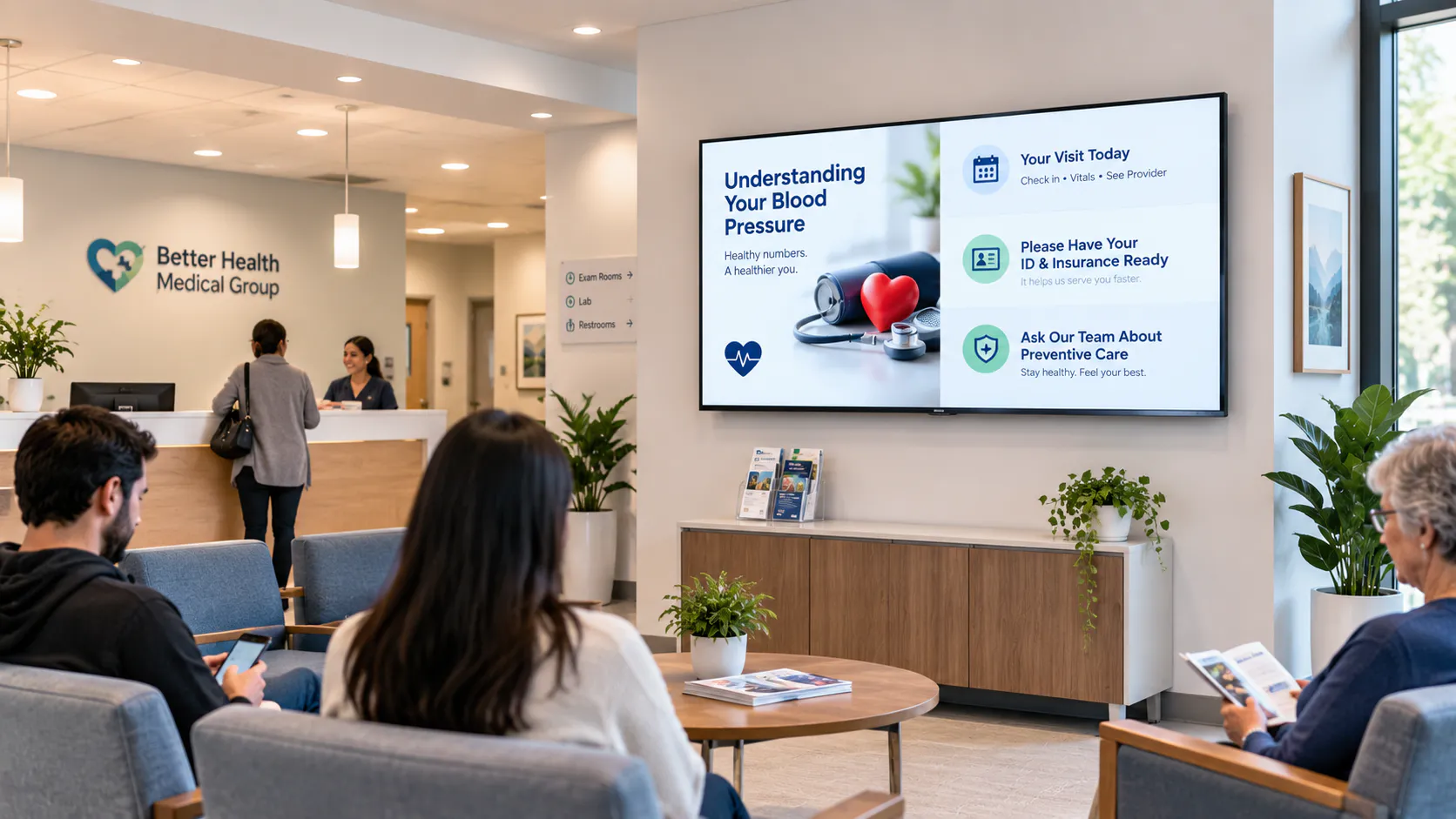
The waiting room is often the first extended experience a patient has inside a medical practice. Before meeting a doctor, dentist, specialist, or other provider, patients may spend several minutes sitting in a space where the practice has their attention.
Yet many waiting-room televisions are still used primarily for cable television, news, or programming that has little connection to the practice.
Digital signage for waiting rooms offers another approach.
Instead of allowing a television network to determine what patients see, a medical office can use its screens to display relevant information, general patient education, office announcements, services, QR codes, seasonal reminders, quizzes, and other useful content.
For a small practice, that might mean turning one existing compatible TV into a digital display. For a larger healthcare organization, it could mean managing medical office TV screens across several departments or locations.
The technology is only part of the equation, however. Effective waiting room digital signage depends on what you display, how easily patients can understand it, and whether the content actually improves the waiting-room experience.
Digital Signage Solutions for Waiting Rooms Should Have a Purpose
Putting a screen on a wall doesn't automatically improve a waiting room.
The first question should be: What do we want this screen to accomplish?
Good digital signage solutions for waiting rooms start with a clear communication goal. A practice may want to reduce repetitive front-desk questions, explain available services, provide general educational information, welcome patients, or make waiting time feel more useful.
Content might include:
- Office hours and contact information
- General health and wellness information
- Seasonal reminders
- Available services
- New provider announcements
- Office policies
- QR codes
- General insurance or payment information
- Community announcements
- Welcome messages
- Educational questions and quizzes
This is the difference between simply having waiting room TV screens and having a communication system.
A screen should earn its place on the wall.
If patients cannot read it, understand it, or find the information useful, adding more content won't solve the problem.
Digital Signage for Medical Offices Goes Beyond the Waiting Room
Although the main waiting area is an obvious place for a display, digital signage for medical offices can be useful in other public-facing areas of a practice.
A reception area might display general office information. A secondary waiting area could show educational content. A checkout area might display reminders or a QR code. A larger practice may have different information needs in different departments.
This is where medical office digital signage becomes more useful than simply putting the same video on every TV.
Each screen can have a specific purpose.
The important point is not how many screens a practice has. It is whether each screen is communicating something useful in the place where it is installed.
Design for the Person Sitting Across the Room
One of the most common mistakes with medical waiting room displays is treating a television like a computer monitor.
It isn't.
A patient may be sitting 10, 15, or 20 feet away. Small paragraphs, crowded graphics, and tiny QR codes may look fine on a laptop but become difficult to understand across a room.
Effective waiting room display screens should generally favor:
- Large text
- Short messages
- Clear visual hierarchy
- Strong contrast
- Simple imagery
- Adequate spacing
- Enough time to read each message
A useful rule is simple: if someone needs to walk closer to the TV to understand the main message, the design probably needs to be simplified.
Turn Medical Office TV Screens Into Useful Digital Displays
Practices sometimes assume digital signage requires replacing every television with specialized commercial hardware.
That isn't necessarily the case.
Depending on operating hours, hardware compatibility, brightness requirements, and the environment where the screen will be installed, a compatible television may be suitable for a digital signage setup.
That gives practices an opportunity to turn existing medical office TV screens into communication displays instead of using them exclusively for regular television programming.
The basic concept behind medical waiting room digital signage is straightforward: the practice decides what content appears on the screen.
That could be one full-screen image, a sequence of images and videos, or a layout containing more than one type of content.
For smaller practices, the ability to use compatible existing equipment can also lower the barrier to getting started with digital screens for waiting rooms.
Use Patient Information Displays for Useful General Information
Medical offices answer many of the same general questions throughout the day.
What time does the office close? What services are available? Is there a new provider? Where can a patient find additional information? Is there a QR code they should scan?
Patient information displays can help communicate some of this general information before a patient reaches the front desk.
The same screens can support digital signage for patient education.
A dental practice could display general oral-health information. A pediatric practice might feature age-appropriate wellness content. A primary-care office could rotate general seasonal health reminders.
But there is an important distinction between patient education and private patient information.
Waiting room information screens are visible to everyone in the room. Practices should have appropriate privacy and compliance procedures and should not treat a public screen as a replacement for private communication with an individual patient.
Good digital signage for healthcare should support communication without compromising the professional nature of the environment.
Use Split-Screen Templates to Make One Screen More Useful
A waiting-room display doesn't always have to show one piece of content across the entire television.
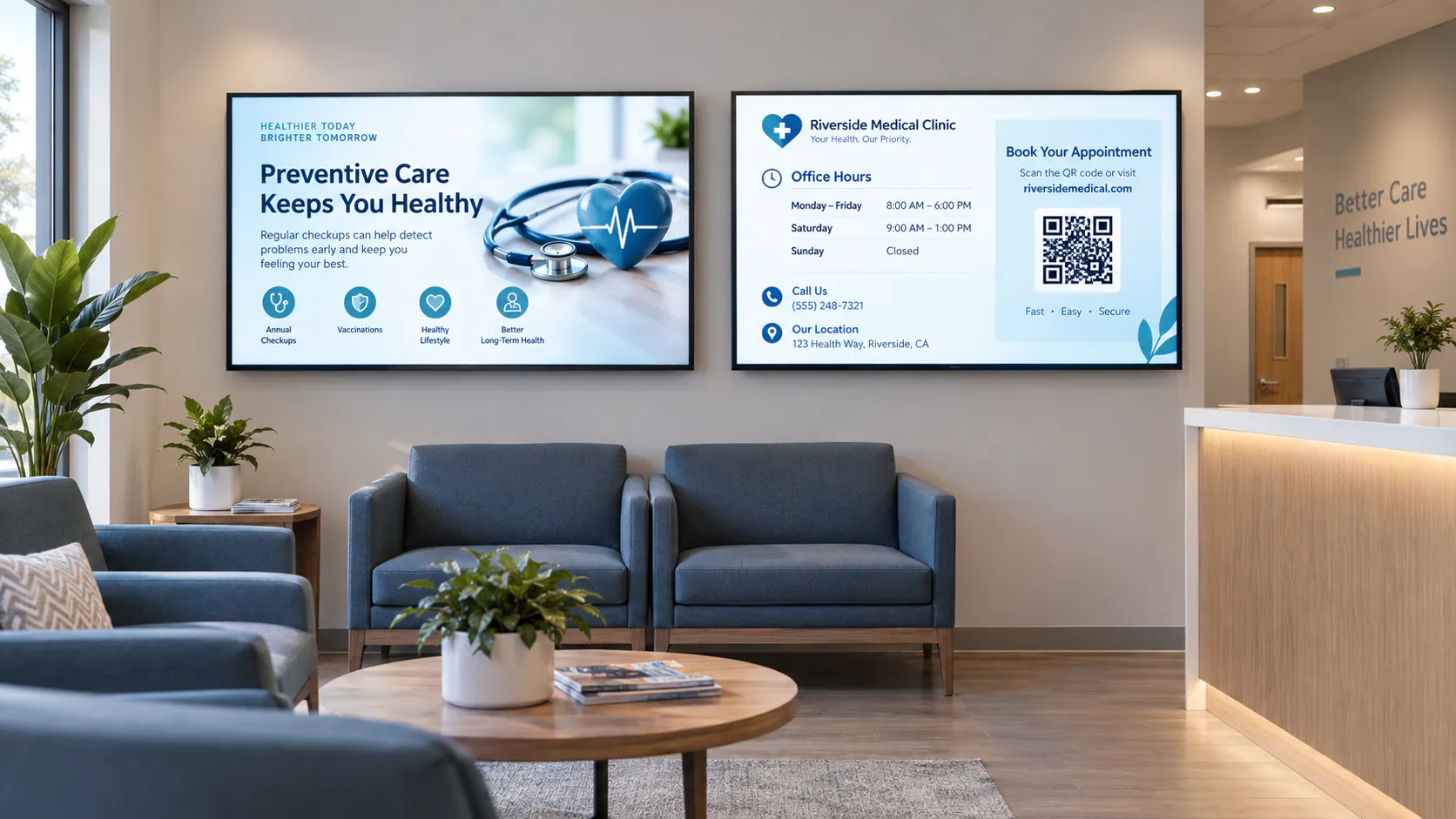
Split-screen templates can divide the display into separate areas, allowing a practice to communicate more than one message without adding another TV.
For example, the larger portion of a screen could show a general patient-education graphic while a smaller section displays office hours or a QR code.
Different layouts can include:
- Full-screen horizontal content
- Left-and-right split screens
- 3/4 and 1/4 screen layouts
- Vertical top-and-bottom layouts
- Full-screen vertical content
A 3/4 and 1/4 layout might use most of the screen for educational content while keeping an office announcement visible in the remaining section.
A left-and-right layout could place a general wellness message on one side and practice information on the other.
Used thoughtfully, templates can make waiting room digital displays more versatile.
Used poorly, however, they can make a screen harder to read.
The goal isn't to fill every available space. If splitting a screen causes text to become too small, a full-screen layout is the better choice.
Use Quizzes to Keep Waiting Patients Engaged
Waiting-room content doesn't always have to be passive.
Simple educational quizzes can give patients something to think about while they wait.
A dental practice might display:
QuizHow long should you brush your teeth?
After several seconds, the next image could reveal the answer.
A pediatric office might use age-appropriate educational trivia. A primary-care office could display general health and wellness questions. Other practices can build quizzes around educational topics relevant to the type of care they provide.
This approach can make healthcare waiting room digital signage feel less repetitive.
The quiz itself doesn't need to be complicated. In fact, simpler is usually better.
One screen asks a question. The next provides the answer. Another educational message follows, and the rotation continues.
The finished quiz images can be created using the practice's preferred designer or design software and uploaded to Billiie.
Billiie displays the finished content; it does not create or edit the quiz inside the platform.
Quizzes can also work with split-screen templates. One section might display the question while another keeps important general office information visible.
The purpose isn't entertainment for its own sake. The strongest quizzes reinforce useful educational information while giving patients something worthwhile to look at.
Update Waiting Room Digital Displays Without Standing in Front of the TV
Printed signs have a simple problem: someone has to physically replace them.
When an announcement changes, a poster becomes outdated, or seasonal information is no longer relevant, an employee has to notice it, create a replacement, print it, and change the sign.
With digital signage software for waiting rooms, the physical screen and the content displayed on it become separate.
The practice creates its finished image or video using its preferred design software or designer, uploads the finished content, and assigns it to the appropriate screen.
There is no need to stand in front of the television with a USB drive every time content changes.
Content can also be scheduled and given an end date.
For example, a flu-season message, holiday schedule, or temporary announcement doesn't need to remain on a screen indefinitely.
This is one of the practical advantages of waiting area digital signage: temporary information can actually remain temporary.
Doctor Office Digital Signage Should Match the Practice
There is no universal waiting-room content strategy because different practices serve different patients.
Doctor office digital signage may focus on general wellness information, available services, practice announcements, and seasonal reminders.
Digital signage for doctors offices can also be used to introduce providers, display general policies, or direct patients to additional resources.
A pediatric office may use brighter educational graphics and simple quizzes, while a specialist's office may use a quieter, more informational approach.
The technology can be similar while the content is completely different.
That's how it should be.
Good signage should feel like it belongs in the practice where it is being displayed.
Dental Waiting Room Digital Signage
Dental practices are particularly well suited to educational waiting-room content because there are many simple topics that can be communicated visually.
Dental waiting room digital signage might include general information about brushing, flossing, routine cleanings, or available services.
Dental office digital signage can also be used for practice announcements, provider introductions, office information, and educational quizzes.
For example, a practice might alternate between a general oral-health tip, a quiz question, an office announcement, and information about a service.
This provides more variety than leaving one static poster on the wall for months.
Clinic Digital Signage and Other Healthcare Waiting Areas
Clinics often have similar communication needs.
Clinic digital signage can provide general information in reception areas, waiting spaces, and other public-facing areas.
Likewise, digital signage for clinics can help organizations maintain more control over what visitors see on their screens.
The same principle applies across healthcare digital signage more broadly.
A screen in an urgent care center may have a different purpose than one in a dental practice, specialist's office, or pediatric clinic.
Effective digital signage for waiting areas starts with understanding who is sitting in the room and what information is appropriate and useful to them.
Manage Multiple Screens From One Dashboard
One screen is relatively easy to manage.
The challenge grows when an organization has several displays.
A practice might eventually have:
- Screen 1Main Waiting Room
- Screen 2Secondary Waiting Area
- Screen 3Checkout Area
- Screen 4Another Department
- Screen 5Second Location
A centralized approach allows digital displays for medical offices to be organized rather than managed as unrelated televisions.
This becomes particularly valuable for digital signage for multi-location medical offices.
An organization with several locations may want certain content displayed everywhere while allowing individual locations to manage other screens.
Assign Screens to Team Members
Screen management doesn't always need to sit with one person.
A practice can assign a screen to another team member to manage when appropriate.
For example, someone responsible for one location could manage that location's assigned display without needing responsibility for every screen across the organization.
This can be particularly useful as digital signage solutions for medical offices grow from one waiting-room TV into a larger network of screens.
What to Look for in Medical Office Signage Software
More features do not automatically make signage software better.
When comparing medical office signage software or waiting room signage software, focus on the everyday tasks the practice actually needs to perform.
Consider whether the system allows you to:
- Upload finished images
- Upload videos
- Assign content to specific screens
- Schedule content
- Set end dates
- Use different screen templates
- Manage screens remotely
- Organize multiple displays
- Assign screens to team members
- Manage screens across multiple locations
The best system is one employees can realistically use without turning routine screen management into another technical project.
Affordable Digital Signage for Waiting Rooms
Cost becomes more important as the number of screens grows.
A complete digital signage solutions for medical offices setup may involve televisions, mounts, compatible devices, installation, content creation, and software.
Software pricing can be especially important because a practice may eventually want several screens.
Billiie Digital Signage is $1 per month per screen — every screen, including your first.
per month
- 1 screen$1/mo
- 10 screens$10/mo
- 100 screens$100/mo
- Includes your first screen
- No long-term contract
- Cancel anytime
That makes it possible for practices looking for affordable digital signage for waiting rooms to begin with a single display and add more when there is a reason to do so.
A small dental practice may only need one screen.
A larger medical office may need several.
A multi-location organization may eventually manage dozens.
There is no reason to build the entire system on day one.
Choosing Digital Signage for Medical Office Waiting Rooms
The most successful waiting-room displays aren't necessarily the ones with the most animations, the most screens, or the most information.
They're the ones patients can actually understand.
When planning digital signage for medical office waiting rooms, start with a few basic questions:
- 1What information would be useful to someone sitting here?
- 2Can they read it from their chair?
- 3Does it belong in a public waiting area?
- 4How often will it need to change?
- 5Would a full-screen layout or split-screen template communicate it more clearly?
- 6Could a simple quiz make educational information more engaging?
Those decisions matter more than simply putting another TV on the wall.
Get Started With Digital Signage for Waiting Rooms
A waiting-room television can be more than background noise.
Used thoughtfully, it can become a communication tool for the practice—a place for general patient education, office announcements, QR codes, quizzes, seasonal information, and other useful content.
Billiie allows businesses to upload finished images and videos, assign content to screens, use different screen templates, schedule content, set end dates, manage screens remotely, and assign screens to team members.
The practice remains in control of the content it creates and uploads.
Whether you're considering medical waiting room digital signage, digital signage for medical offices, waiting area digital signage, or a larger healthcare digital signage setup, start with the patient experience rather than the technology.
Make the message readable.
Keep the screen useful.
Use split-screen layouts when they improve communication—not simply because they're available.
Give patients something worthwhile to see.
And expand to additional screens when those screens have a clear purpose.
Billiie Digital Signage is $1/month per screen, including your first.
Affordable. Digital. Simple.
Just $1/month per screen — every screen, including your first.
Start Your Waiting Room Digital Signage