Digital Menus for Bakeries: Showcase Cakes, Pastries and Catering
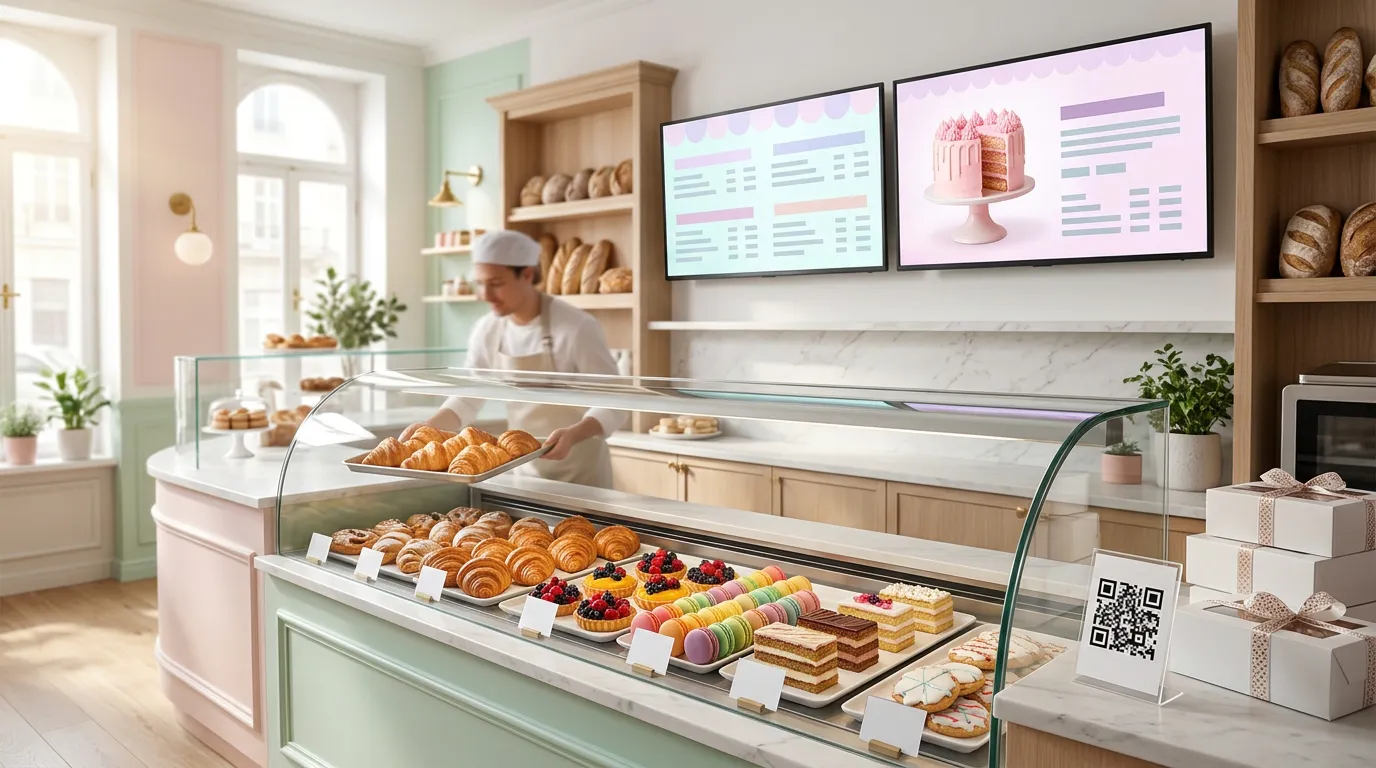
A bakery case sells with its eyes. Customers walk in, look at the croissants, cakes, and cookies, and decide in seconds.
The trouble is everything the case can't show: today's flavors, prices, what's sold out, custom cake options, catering trays, and holiday pre-orders. That information usually ends up on handwritten cards, a crowded chalkboard, or a staff member repeating the same answers all day.
A digital menu for a bakery solves that. A screen shows customers what you offer and what it costs, and QR ordering lets them place orders, including larger catering orders, from their phone.
Here's how bakeries can use digital menus, what to show, and how to set them up.
Why Bakeries Benefit From Digital Menus
Bakeries have a few challenges that make digital menus especially useful:
Daily changes. What you baked this morning isn't always what you baked yesterday.
Items sell out. The most popular items are often gone by noon.
Seasonal favorites. Pumpkin, apple, peppermint, and holiday cookies come and go.
Custom orders. Cakes and special requests involve sizes, flavors, and messages.
Catering. Office trays, party platters, and event orders need clear options and pricing.
Morning rushes. Regulars want their coffee and pastry fast.
A printed menu can't keep up with that. A screen can.
Use a Bakery Menu Board Behind the Counter
A bakery menu board on a TV behind the counter answers the questions customers would otherwise ask.
Organize it the way people shop:
Pastries: croissants, danishes, muffins, scones
Breads: loaves, rolls, baguettes
Cakes and desserts: slices, whole cakes, cupcakes, cookies
Drinks: coffee, tea, and cold drinks
Today's specials: seasonal or limited items
Keep prices easy to find, and use large text that can be read from the line. If your menu is long, split it across two screens, one for baked goods and one for drinks and specials.
Our guide on how to create a digital menu board walks through the full setup, and our menu board design tips cover font sizes, layout, and pricing.
Let Photos Do the Selling
Bakeries have an advantage most businesses don't: the products are beautiful.
Use that. A large, well-lit photo of a layer cake, a tray of fresh croissants, or a box of decorated cookies can sell more than a long description.
A few tips:
Use your own photos of your actual products when you can.
Feature one item per slide so it gets full attention.
Keep the background simple so the food stands out.
Rotate photos with your menu so the screen doesn't feel static.
Show what you want to sell, like a high-margin cake or a new seasonal item.
Promote Daily and Seasonal Specials
A screen makes it easy to change your featured items as often as your baking schedule does.
With Billiie Digital Signage, you can schedule content by time and date and set end dates. Feature morning pastries early in the day, switch to cakes and cookies in the afternoon, and let a seasonal item disappear from the screen automatically when the season ends.
For more ways to feature limited items, see our guide on how to promote daily specials with digital screens.
Keep the Screen Accurate When Items Sell Out
Nothing frustrates customers more than ordering something that's already gone.
Because a digital menu is easy to change, you can remove or swap sold-out items during the day instead of crossing them out on a chalkboard. Many bakeries also use the screen to set expectations, such as "Croissants usually sell out by 11 AM," which encourages customers to come back earlier next time.
Add QR Ordering for Pickup
Bakery QR ordering lets customers order from their phone instead of waiting in line.
With Billiie Digital Menu Ordering:
Customers order from their phone's web browser, with no app to download.
You can add options, extras, and add-ons, such as sizes, flavors, fillings, or a dozen versus a half dozen.
Customers can add notes, like a cake message or a pickup time request.
A sound alert tells your staff when a new order arrives.
Each order gets its own order number.
You mark the order ready, and the customer is notified that it's time to pick up.
Place QR codes on the counter, in the front window, on bakery boxes, and on bags so customers can order again from home. Our guide on where to put QR code menus covers more placement ideas.
Handle Catering Orders Separately
Catering orders for offices, parties, and events are often a bakery's biggest tickets. They also need different handling from a single croissant.
Billiie Digital Menu Ordering lets you create multiple QR codes and send orders to the area of your choice. You could give catering its own QR code and menu with trays, platters, and boxed assortments, so those orders reach the person handling catering instead of the front counter.
Promote catering on your screen with a simple message:
OFFICE MEETING? ORDER A PASTRY TRAY. SCAN TO ORDER.
Add the same QR code to receipts and boxes so customers who loved your pastries know they can order for their next event.
Promote Holiday Pre-Orders Early
For many bakeries, Thanksgiving and the winter holidays are the busiest weeks of the year.
Use your screens to promote pre-orders well ahead of time:
Pies for Thanksgiving
Holiday cookie boxes
Yule logs and specialty cakes
Party trays for office celebrations
Show a clear order deadline, schedule the promotion to end on that date, and make it easy to order with a QR code. For more seasonal ideas, see our list of small business marketing ideas for November.
Where to Place Screens in a Bakery
Behind the counter: your main menu board
Above or beside the display case: featured items and prices
In the front window: today's specials or a seasonal favorite to draw people in
Near the register: catering, gift cards, and pre-order promotions
Near seating: coffee refills, pastries, and QR codes to order more
Common Bakery Digital Menu Mistakes
Too many items on one screen. Split the menu across screens instead.
Tiny prices. Customers want to know what things cost.
Old seasonal items. Set end dates so they disappear on time.
Low-quality photos. A blurry cake doesn't sell.
Forgetting catering. Many customers don't know you offer it until they see it.
What Does It Cost?
Menu boards: With Billiie Digital Signage, your first screen is free, forever. Each additional screen is $1 per month.
QR ordering: Billiie Digital Menu Ordering is $20 per month.
You'll also need a TV and a Fire TV Stick or compatible device, if you don't already have them. Billiie displays your finished images and videos, so create your designs in a free tool like Canva or work with a designer.
Show Off What You Bake
Your products already look great. A digital menu helps customers see them, understand your prices, and order more easily, whether they want one croissant or a tray for the office.
For more ideas, see how coffee shops use digital menus and QR ordering or how restaurants use digital signage.
Create your Billiie account and put your bakery menu on screen today.
Ready to bring Billiie to your business?
Manage your screens, content, and locations from one simple dashboard.
No commercial signage hardware neededPowered by Billiie