Digital Signage for Pizza Shops: Menus, Specials and Combos
Pizza shop menus are some of the hardest menus to fit on a wall.
There are whole pies and slices, small, medium, large, and extra-large, specialty pizzas, build-your-own toppings, calzones, wings, salads, sides, drinks, and the combo deals that tie it all together. Then there's the lunch special, the late-night deal, and the game-day bundle.
A printed board can't show all that clearly, and it can't change when your specials do.
Digital signage for pizza shops solves both problems. A few TVs can show your full menu clearly, promote the right deal at the right time, and change instantly when prices or specials change.
Here's how pizza shops can use digital menu boards, what to show, and how to set it up.
Why Pizza Shops Need Digital Menu Boards
Pizza shops have a few things that make digital signage especially useful:
Big menus with lots of sizes and options
Combos and deals that change by day or time
Rush periods at lunch, dinner, and late night
Price changes as cheese, flour, and ingredient costs move
Walk-in customers deciding quickly at the counter
A pizza menu board that's easy to read and easy to update helps customers order faster, and helps you sell more of what you want to sell.
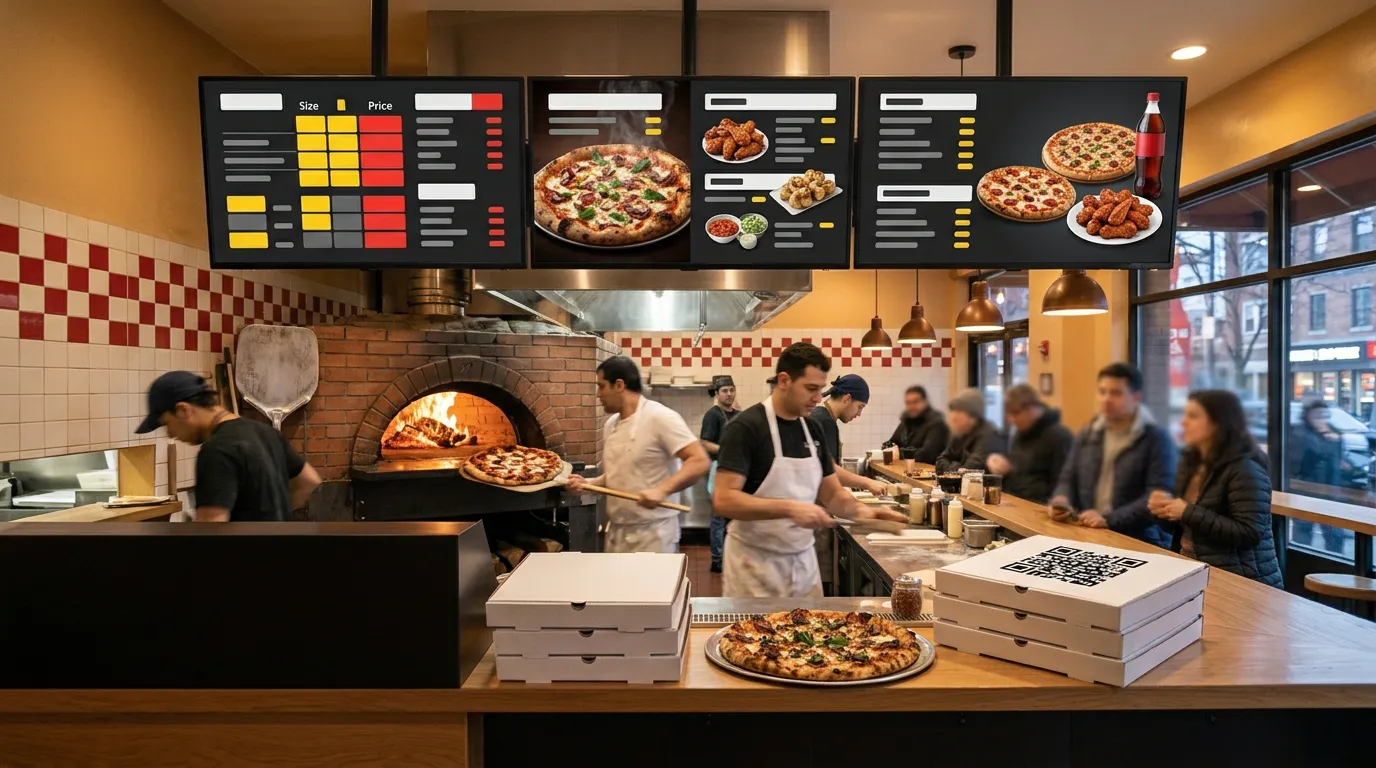
Split Your Menu Across Several Screens
Trying to fit an entire pizza menu on one screen usually means tiny text nobody can read.
Instead, give each part of the menu its own screen:
Screen 1: Pizzas, with a size-and-price grid
Screen 2: Specialty pies and slices
Screen 3: Wings, calzones, salads, and sides
Screen 4: Combos, deals, and drinks
Customers can read each section from the counter, and you can update one screen without touching the others.
Use a Size-and-Price Grid
Pizza pricing is where many menus get confusing.
Instead of listing every pizza with four separate prices, use a grid: sizes across the top, pizzas down the side, prices in the middle. Customers find their pizza and their size in one glance.
List toppings once, with the price per topping by size, rather than repeating them for every pie. For more layout tips, see our guide to menu board design.
Promote Combos and Deals
Combos are where pizza shops make their best margins, and a pizza shop TV menu is the perfect place to sell them.
Give your best deal a screen, or a slide in the rotation, with a big photo and a clear price:
FAMILY DEAL: 2 LARGE PIZZAS + WINGS + 2-LITER — $39.99
Keep each deal simple and specific. Customers should understand exactly what they get and what it costs in a few seconds.
Show the Right Special at the Right Time
Different deals work at different times of day.
Lunch: Slice-and-soda specials for the lunch crowd
Dinner: Family meals and large-pizza deals
Late night: Late-night slices and party sizes
Game days: Wings and party bundles
With Billiie Digital Signage, you can schedule content by time and date. Your pizza specials display can show the lunch special until 3 PM, then automatically switch to the dinner deal. You can set an end date for a limited-time offer, like a new specialty pie, so it disappears from the screen when the promotion ends.
Our guide on how to create a digital menu board shows how to set up scheduled menus step by step.
Feature a Pizza of the Month
A rotating specialty pizza gives regulars a reason to try something new.
Feature it with a large, appetizing photo and a short description. When the month ends, schedule the next one. It keeps your menu feeling fresh without reprinting anything.
Take Orders Without Tying Up the Phone
For many pizza shops, the phone is the biggest bottleneck. Every call takes a staff member away from the oven or the counter, and long pizza orders with lots of toppings are easy to get wrong over the phone.
QR ordering helps. Customers scan a QR code, on your counter, window, menu board, or pizza box, and build their order on their phone.
With Billiie Digital Menu Ordering:
Customers order from their phone's web browser, with no app to download.
You can set up toppings, options, extras, and add-ons, which is perfect for build-your-own pizzas.
Customers can add notes, like "well done" or "light sauce."
A sound alert lets your staff know a new order has arrived.
Each order gets its own order number.
You mark the order ready, and the customer is notified that it's time to pick up.
Pizza orders are some of the most detailed orders there are, so letting customers choose their own toppings cuts down on mistakes. Our comparison of QR code ordering vs. phone orders explains how to offer both.
Put a QR Code on the Box
A QR code printed on your pizza box goes home with every order.
The next time that customer is hungry, your menu is one scan away. It's one of the simplest ways to turn a single order into a repeat customer.
Design Tips for Pizza Shop Screens
Use big, mouth-watering photos of your best pies, but don't let them crowd out prices.
Keep text large and bold, readable from the door.
Use strong contrast, like white text on a dark background with prices in yellow or red.
Limit each screen to one category so customers can scan quickly.
Highlight one deal at a time rather than shouting about everything at once.
What Do You Need?
A TV for each screen. Many pizza shops already have one.
A Fire TV Stick or a TV with Fire TV or Google TV built in, to run the Billiie app.
Wi-Fi.
Your menu designs. Create them in a free tool like Canva, or work with a designer. Billiie displays your finished images and videos.
How Much Does It Cost?
Digital menu boards: With Billiie Digital Signage, your first screen is free, forever. Each additional screen is $1 per month, so a four-screen pizza menu costs $3 per month.
QR ordering: Billiie Digital Menu Ordering is $20 per month.
Sell More Pizza With Less Hassle
A clear menu helps customers order faster. The right deal at the right time sells more combos. And QR ordering takes pressure off your phone during the rush.
For more ideas, see how restaurants use digital signage.
Create your Billiie account and put your pizza menu on screen today.
Ready to bring Billiie to your business?
Manage your screens, content, and locations from one simple dashboard.
No commercial signage hardware neededPowered by Billiie